


Acer Aspire Go 15 AG15-71P Review: Affordable Laptop for Study and Everyday Use
Table of Contents
The Acer Aspire Go 15 AG15-71P takes a refreshingly straightforward approach to the affordable laptop market. Rather than trying to imitate a premium ultrabook or squeeze gaming credentials out of modest hardware, it concentrates on the things that matter most to everyday users: a comfortable large display, competent processor, plenty of memory, useful connectivity, respectable battery life, and a full-size keyboard.
That positioning makes the Aspire Go 15 particularly interesting for students, office workers, remote employees, and families looking for a general-purpose Windows laptop without paying for performance they may never use.
It is not a machine designed for demanding creative workloads or serious gaming. Its integrated graphics, basic webcam, modest color coverage, and unlit keyboard make that clear. But within its intended role, the AG15-71P delivers a balanced experience and avoids many of the compromises that can make inexpensive laptops frustrating to live with.

Positioning and Price
The Aspire Go 15 belongs firmly to the mainstream budget and lower-midrange laptop category. Depending on configuration and retailer, the model discussed in the reference material falls roughly within the $490–$870 range.
That broad price range is important because specifications can vary between regional configurations. The particular configuration reviewed here pairs an Intel Core i5-1334U with 16 GB of memory and a 512 GB SSD.
The philosophy behind the machine is easy to understand: spend money where it improves everyday usability rather than chasing headline specifications.
For university work, office applications, web browsing, online meetings, spreadsheets, document editing, streaming, and general multitasking, that strategy makes sense. The laptop also provides a surprisingly comprehensive collection of physical ports, reducing the need for dongles and USB hubs.
There are, however, obvious areas where Acer has kept costs under control. The chassis is plastic, the keyboard is not backlit, the display is not designed for professional color work, and the webcam remains a basic 720p unit.
Those compromises are reasonable as long as buyers understand what this laptop is—and what it isn’t.
Key Specifications
| Specification | Acer Aspire Go 15 AG15-71P |
|---|---|
| Display | 15.6-inch IPS |
| Resolution | 1920 × 1080 |
| Aspect ratio | 16:9 |
| Refresh rate | 60 Hz |
| Processor | Intel Core i5-1334U |
| CPU configuration | 10 cores / 12 threads |
| Maximum CPU frequency | Up to 4.6 GHz |
| Graphics | Integrated Intel UHD Graphics |
| Memory | 16 GB DDR5 |
| Memory configuration | Single-channel in reviewed configuration |
| Storage | 512 GB PCIe SSD |
| Wireless | Wi-Fi 6, Bluetooth 5.1 |
| USB-C | 2 × USB-C 3.2 Gen 2 |
| USB-A | 2 × USB 3.2 Gen 1 |
| Video output | HDMI 2.1, USB-C DisplayPort |
| Audio | 3.5 mm combination jack |
| Webcam | 720p HD |
| Keyboard | Full-size, dedicated numeric keypad |
| Keyboard backlight | No |
| Battery | 53 Wh |
| Charger | 65 W USB-C |
| Body material | Plastic |
| Weight | Approximately 1.8 kg |
| Dimensions | 362.9 × 239.7 × 19.95 mm |
| Operating system | Not included in the reviewed configuration |
Design and Build Quality
The Aspire Go 15 does not attempt to turn heads. Its design is conventional, with a silver-colored exterior contrasting with darker sections around the keyboard and display.
That restraint is actually appropriate for its intended audience. The laptop looks professional enough for an office, classroom, or meeting room without drawing unnecessary attention.
The plastic construction is obvious, but the machine does not feel flimsy. The chassis remains reasonably rigid during ordinary handling, and the lid and hinges provide a reassuring degree of resistance. The laptop does require both hands to open, but once positioned, the display remains stable rather than constantly wobbling.
At approximately 1.8 kg, the AG15-71P is not an ultraportable, but that is a reasonable weight for a 15.6-inch laptop with a full-size keyboard and numeric keypad. It can be carried in a backpack without becoming a major burden.
Acer also incorporates recycled plastic into the chassis and has certifications associated with energy efficiency and environmental considerations. That is a welcome feature at this price level.
The biggest visual weakness is the relatively thick display bezel. Modern laptops have increasingly moved toward slimmer borders, so the Aspire Go 15 looks somewhat dated by comparison. Nevertheless, the bezel does not affect the laptop’s fundamental usability.
Ports and Connectivity
One of the strongest aspects of the Aspire Go 15 is its physical connectivity.
The laptop includes two USB-C ports with Power Delivery and DisplayPort support. This is particularly useful because USB-C is not restricted to charging: compatible monitors, docks, and other accessories can also be connected through it.
There are also two USB-A ports, giving users easy compatibility with traditional mice, keyboards, flash drives, and other peripherals.
HDMI provides a straightforward way to connect an external monitor or television, while the 3.5 mm audio jack accommodates wired headphones and headsets. A Kensington lock slot is also present for users working in shared environments.
Wireless connectivity is similarly appropriate for the class, with Wi-Fi 6 and Bluetooth 5.1.
For a student or office worker, this selection is arguably more useful than adding a handful of fashionable features. You can connect multiple peripherals, an external display, and wired audio without immediately reaching for a hub.
Keyboard and Touchpad
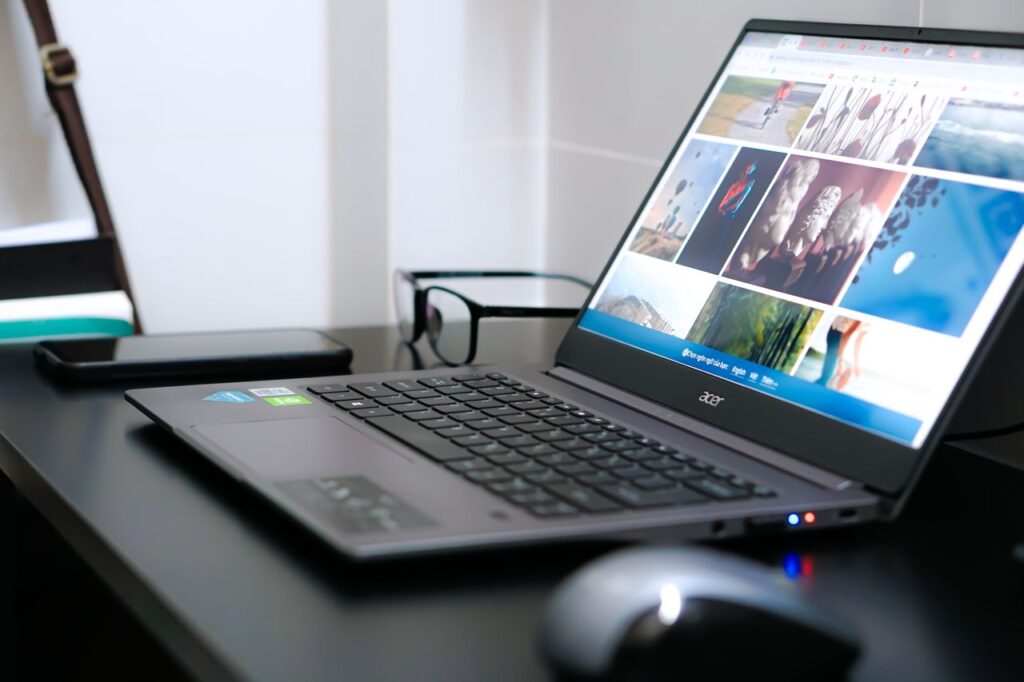
The full-size keyboard is one of the laptop’s most practical features.
A dedicated numeric keypad is especially valuable for users working with spreadsheets, accounting software, statistics, inventory systems, or large quantities of numerical information.
Key travel is relatively short, but the keys provide recognizable tactile feedback. Typing feels predictable rather than mushy, which matters when the laptop is expected to serve as a primary work machine.
There are some ergonomic imperfections. The arrow-key arrangement is somewhat compressed, and the positioning of the power button may require a little care until the user becomes accustomed to it.
The largest omission is keyboard backlighting.
This is a feature that increasingly appears even on affordable laptops, and its absence is noticeable. Anyone who regularly works in dim rooms will have to rely on ambient lighting.
The touchpad is generously sized and supports Microsoft’s Precision Touchpad standard, so Windows gestures and cursor movement are handled accurately. Its smooth surface makes navigation comfortable, although it can accumulate fingerprints.
Overall, the input experience is functional and suited to long periods of office work, with the missing backlight being the main annoyance.

Display Quality
The 15.6-inch Full HD IPS screen is clearly optimized for productivity rather than visual excellence.
Its 1920 × 1080 resolution remains perfectly serviceable at this size. Text is sufficiently sharp for documents and browser work, while the 16:9 aspect ratio remains familiar for video playback.
The matte coating is particularly useful in an office or classroom because it reduces distracting reflections. Viewing angles are also considerably better than those typically associated with inexpensive TN panels.
Brightness is around the 300-nit region at maximum in the referenced configuration. That is adequate indoors, but the screen is not particularly well suited to bright outdoor environments.
Color reproduction is the larger limitation. Coverage is approximately 56.5% of sRGB, with substantially lower coverage of wider color spaces. This means the display is not intended for professional photography, graphic design, video color grading, or other color-sensitive work.
For Word documents, spreadsheets, websites, presentations, streaming services, and online classes, however, the panel does its job.
The display therefore represents a classic budget-laptop compromise: good enough ergonomics and viewing angles, but limited brightness and color volume.
Hardware and Everyday Performance
The Intel Core i5-1334U is a sensible processor choice for this type of machine. Its hybrid architecture combines performance and efficiency cores, allowing it to handle ordinary multitasking without requiring the power consumption or cooling system associated with a high-performance CPU.
Paired with 16 GB of memory, the system feels considerably more capable than entry-level laptops equipped with 8 GB.
In practical terms, the Aspire Go 15 is comfortable with large numbers of browser tabs, office applications, messaging software, PDF documents, spreadsheets, and video calls running simultaneously.
That is precisely where this laptop makes the most sense.
The 512 GB SSD also provides enough capacity for a typical collection of applications, documents, photographs, and offline media. SSD storage makes everyday operations such as booting, launching applications, and opening files much faster than older mechanical drives.
The integrated Intel UHD Graphics processor is the major performance limitation. It is not designed for demanding 3D workloads. Older and relatively lightweight games can be playable at reduced settings, but modern AAA gaming is outside the machine’s intended territory.
Likewise, serious video editing, 3D rendering, CAD workloads, and other GPU-intensive applications should be approached cautiously.
Detailed Performance Analysis
The most important characteristic of the AG15-71P is consistency rather than raw speed.
For everyday productivity, the Core i5 processor and 16 GB of RAM create a comfortable working environment. Switching between a browser, word processor, spreadsheet, email client, messaging application, and PDF viewer should not create the kind of constant slowdowns associated with entry-level machines.
The 16 GB memory configuration is particularly helpful. Modern browsers can consume significant amounts of RAM, and users who frequently keep many tabs open will benefit from having more headroom.
There is also enough processing power for ordinary video conferencing, document conversion, light photo manipulation, and other common workloads.
Where performance begins to fall away is sustained heavy computing. The integrated GPU prevents the system from becoming a serious workstation, while the low-power processor is designed around efficiency rather than maximum sustained throughput.
For gaming, the laptop should be viewed as a machine capable of handling casual and older titles rather than a gaming system. Lower graphical settings and modest resolutions are appropriate expectations.
This distinction is important because the AG15-71P can feel fast during normal use while still being unsuitable for demanding applications. Those two statements are not contradictory: responsiveness in everyday tasks and high-end computational performance are very different requirements.
Cooling and Thermal Behavior
Acer uses a relatively simple cooling design centered around a single fan.
For ordinary workloads, the cooling system remains quiet enough that it rarely becomes a distraction. Web browsing, writing documents, watching videos, and similar activities do not place enough pressure on the processor to produce substantial fan noise.
Under heavier loads, the fan becomes audible, but the behavior is relatively predictable rather than erratic.
The reference testing indicates that the processor may briefly reduce its clock speed when a heavy workload begins, before settling into a stable operating range. This is a normal response to changing thermal conditions and does not appear to translate into problematic long-term instability in the intended workload range.
Reported peak CPU temperatures around the low 60-degree Celsius range under the cited testing conditions are also encouraging.
The chassis can become warmer around the exhaust area during sustained workloads, but the laptop does not appear to suffer from the kind of excessive heat that would undermine normal use.
For an affordable productivity notebook, thermal behavior is therefore a positive part of the overall package.
Webcam and Audio
The 720p webcam is functional rather than impressive.
It is suitable for Microsoft Teams, Zoom, Google Meet, online classes, and ordinary video calls, especially under decent lighting. However, image detail is limited, and low-light performance deteriorates noticeably.
Anyone who conducts frequent professional presentations or records video content may want to use an external webcam.
The stereo speakers are similarly basic. Their volume is adequate for system notifications, video calls, lectures, and casual YouTube viewing, but they lack the bass and tonal richness expected from a more premium laptop.
Headphones or external speakers are preferable for music, films, and other situations where sound quality matters.
Battery Life and Charging
The 53 Wh battery strikes a sensible balance between capacity and chassis size.
In mixed everyday use—including browsing, document editing, messaging, and occasional video playback—the reference experience suggests approximately 8–9 hours of practical runtime.
That makes the laptop suitable for a substantial study session or workday, although actual results will vary considerably with screen brightness, wireless activity, application load, and power settings.
The advertised maximum figure can be higher under controlled conditions, but real-world expectations should be based on the more conservative mixed-use result.
USB-C charging is an important convenience. Because the laptop supports charging through USB-C, users can potentially rely on compatible chargers or power banks rather than always carrying the supplied adapter.
A charge time of roughly an hour and a half is also respectable for this class.
Package Contents and Software
The box follows Acer’s minimalist approach. The package includes the laptop, charger, and documentation without unnecessary accessories.
The environmentally conscious packaging approach is sensible, although buyers expecting a sleeve or other extras will be disappointed.
Another important consideration is the lack of a preinstalled operating system in the reviewed configuration.
This can reduce the purchase price and gives technically confident users freedom over their operating-system choice, but it also means the laptop is not necessarily ready to use immediately after unboxing.
For someone comfortable installing Windows or another compatible operating system, this is a minor inconvenience. For a first-time computer buyer, it is an additional task that should be considered before purchase.
Pros and Cons
Pros
- Solid everyday performance from the Intel Core i5-1334U
- 16 GB of RAM provides useful multitasking headroom
- 512 GB SSD offers practical storage capacity and responsive operation
- Large 15.6-inch Full HD IPS display
- Matte screen coating reduces distracting reflections
- Full-size keyboard includes a dedicated numeric keypad
- Two USB-C ports support charging and DisplayPort
- HDMI and multiple USB-A ports improve peripheral compatibility
- Wi-Fi 6 provides modern wireless connectivity
- Battery life of roughly 8–9 hours in mixed real-world use
- USB-C charging adds flexibility
- Cooling remains relatively quiet during ordinary work
- Reasonably sturdy construction for a plastic chassis
- Approximately 1.8 kg is manageable for a 15.6-inch laptop
Cons
- Keyboard has no backlighting
- Display color coverage is limited
- Screen brightness is only moderately suitable for indoor use
- 720p webcam is basic
- Built-in speakers lack bass and overall richness
- Integrated graphics are unsuitable for demanding modern games
- Plastic construction lacks the premium feel of metal laptops
- Thick display bezels look dated
- No biometric authentication
- Reviewed configuration does not include a preinstalled operating system
- No protective sleeve is supplied
Who Is This For?
The Acer Aspire Go 15 AG15-71P makes the most sense for people who prioritize practical productivity over premium design.
Students are a natural audience. The 15.6-inch screen provides plenty of space for research and documents, while the numeric keypad is useful for mathematics, statistics, finance, and spreadsheet-heavy coursework. The battery life is also suitable for extended sessions away from a wall outlet.
Office workers should find the hardware more than adequate for email, Microsoft Office, browser applications, video conferencing, document management, and spreadsheets. The port selection is particularly useful in an office environment where external monitors and wired accessories are common.
Remote workers can also benefit from the combination of a large screen, comfortable keyboard, respectable battery life, and USB-C charging.
Home users looking for a general-purpose computer for browsing, streaming, document creation, online banking, video calls, and everyday applications should find the performance appropriate.
It is less suitable for professional creatives, particularly photographers, graphic designers, and video professionals who depend on accurate colors or substantial GPU performance.
It is also not intended for serious gamers. Casual and older games may work, but anyone purchasing primarily for modern gaming should look toward a dedicated gaming laptop with a discrete GPU.
Finally, buyers who strongly prioritize premium materials, an ultra-thin chassis, biometric authentication, or a backlit keyboard may find the compromises more noticeable.
Final Verdict
The Acer Aspire Go 15 AG15-71P is an example of a laptop that understands its job.
It does not attempt to compete with premium notebooks on materials, display technology, or design. Instead, it concentrates on everyday functionality: enough CPU performance for productivity, 16 GB of memory, a useful SSD, a large Full HD screen, extensive connectivity, a comfortable full-size keyboard, and respectable battery life.
Its limitations are equally clear. The display is not suitable for color-critical work, the keyboard lacks backlighting, the webcam and speakers are basic, and integrated graphics place a firm ceiling on gaming and GPU-intensive applications.
None of these characteristics make the laptop inherently problematic; they simply define the audience it is designed for.
For students, office users, remote workers, and households seeking a dependable general-purpose machine, the Aspire Go 15 offers a sensible collection of hardware without unnecessary extravagance. Its strongest quality is arguably the balance between its components: there is enough performance to keep everyday computing comfortable without turning the system into an unnecessarily expensive or power-hungry machine.
The result is not an exciting laptop in the conventional sense. It is something arguably more useful for its target audience: a straightforward computer that can be opened each morning, connected to the internet, and used for hours of work without demanding much attention in return.
That practicality is the core identity of the Acer Aspire Go 15 AG15-71P, and for users whose priorities align with it, that may be exactly what a laptop should be.