

Acer Aspire Go 15 AG15-71P Review: Affordable Laptop for Study and Everyday Use
Table of Contents
The Acer Aspire Go 15 AG15-71P is the kind of laptop that deliberately avoids chasing premium trends. There is no high-refresh gaming panel, no dedicated graphics processor, no extravagant metal chassis, and no attempt to turn a conventional 15.6-inch notebook into a luxury product.
Instead, Acer has focused on something considerably more practical: a reasonably portable laptop with a capable Intel processor, 16 GB of memory, a 512 GB SSD, a useful selection of ports, and enough battery life for a typical day of study or office work.
That approach makes the Aspire Go 15 particularly interesting in a market where inexpensive laptops can sometimes save money by cutting away features that matter in everyday use. Acer’s model makes compromises too, but most of them are relatively easy to understand once you consider its intended audience.
Key Specifications
| Specification | Acer Aspire Go 15 AG15-71P |
|---|---|
| Display | 15.6-inch IPS, 1920 × 1080 |
| Aspect ratio | 16:9 |
| Refresh rate | 60 Hz |
| Processor | Intel Core i5-1334U |
| CPU configuration | 10 cores / 12 threads, up to 4.6 GHz |
| Graphics | Integrated Intel UHD Graphics |
| Memory | 16 GB DDR5 |
| Storage | 512 GB PCIe SSD |
| Wireless | Wi-Fi 6, Bluetooth 5.1 |
| USB-C | 2 × USB-C 3.2 Gen 2, Power Delivery + DisplayPort |
| USB-A | 2 × USB 3.2 Gen 1 |
| Video output | HDMI 2.1 |
| Audio | 3.5 mm combined audio jack |
| Webcam | 720p HD |
| Battery | 53 Wh |
| Charger | 65 W USB-C |
| Keyboard | Full-size, dedicated numeric keypad, no backlight |
| Operating system | None pre-installed |
| Dimensions | 362.9 × 239.7 × 19.95 mm |
| Weight | 1.8 kg |
| Chassis | Plastic, including recycled material |
| Intended use | Study, office work, browsing, multimedia |
Design and Build Quality
The Aspire Go 15 follows a conventional laptop design, and that is not necessarily a criticism. Its silver-and-black color scheme is restrained, while the 15.6-inch chassis manages to avoid feeling excessively bulky.
At approximately 1.8 kg, it is not an ultraportable, but it remains reasonable to carry between home, school, university, or an office. The roughly 20 mm thickness also makes it relatively easy to fit into a typical laptop bag.
The chassis is made primarily from plastic. That is expected at this price level, although Acer has incorporated recycled plastic into portions of the construction. The resulting machine does not feel luxurious, but the build is more reassuring than the price might suggest. The chassis generally remains firm during ordinary handling, with no major creaking or excessive flex.
The display bezels are one of the more obvious reminders that this is a budget-oriented machine. They are relatively thick compared with those on modern premium notebooks. The overall appearance consequently feels more conventional than contemporary.
The hinges are firm and hold the screen securely. The maximum opening angle is approximately 145 degrees. One-handed opening is not really practical because the base tends to lift with the lid, but once positioned, the display remains stable.
Acer has also incorporated ventilation openings toward the rear and raised the rear portion of the laptop slightly when it is sitting on its feet. This is a small design detail, but it helps both ergonomics and airflow.
Ports and Connectivity
Connectivity is one of the Aspire Go 15’s strongest practical features.
The laptop includes two USB-C ports, both supporting Power Delivery and DisplayPort. That combination is particularly useful because USB-C is not limited to data transfer: compatible chargers can power the notebook, while external displays and docking stations can also be connected.
There are also two USB-A ports for conventional peripherals such as mice, keyboards, flash drives, and other accessories.
An HDMI 2.1 output provides another straightforward way to connect an external monitor or television. A 3.5 mm headset jack and Kensington security slot complete the physical connectivity.
Wireless connectivity includes Wi-Fi 6 and Bluetooth 5.1.
For a laptop intended primarily for productivity, this is a sensible collection of interfaces. Many thin notebooks require adapters for basic peripherals, whereas the Aspire Go 15 can handle a conventional desk setup without immediately demanding a USB hub.
Keyboard and Touchpad
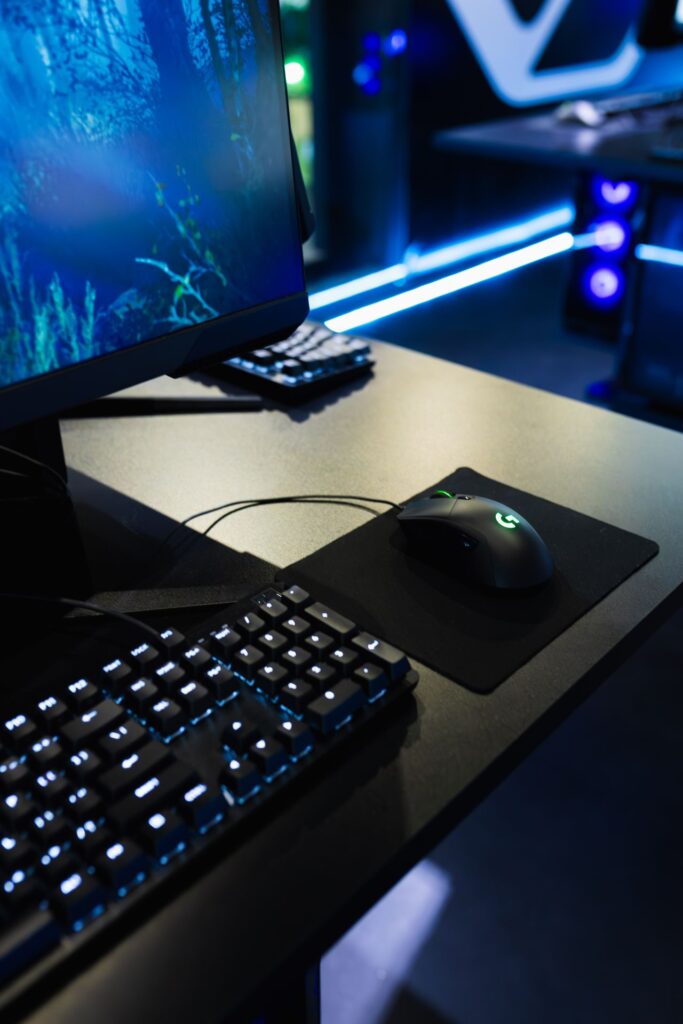
The full-size keyboard is clearly designed with productivity in mind.
Its dedicated numeric keypad is particularly useful for users who work with spreadsheets, accounting information, statistics, or large quantities of numerical data. For those workloads, a 15.6-inch chassis has a genuine advantage over smaller 13- or 14-inch laptops.
Key travel is relatively short, but the keys provide recognizable tactile feedback. Typing feels predictable rather than mushy, and the keyboard is suitable for extended document work.
There are a couple of ergonomic compromises. The arrow-key arrangement is not perfect, and placing the power button within the keyboard area requires a little care.
The bigger omission is keyboard backlighting. This is increasingly common even on relatively affordable notebooks, so its absence is noticeable. Anyone who frequently works in dim rooms will need to rely on ambient lighting.
The touchpad uses Microsoft’s Precision Touchpad standard and provides smooth cursor control and gesture support. Its integrated click mechanism offers reasonably clear feedback. The glossy surface, however, is prone to collecting fingerprints and smudges.
Display Quality
The 15.6-inch Full HD IPS display is functional rather than impressive.
A resolution of 1920 × 1080 remains perfectly adequate at this screen size for documents, websites, office applications, streaming video, and online learning. The 16:9 aspect ratio is familiar, although productivity-oriented laptops increasingly use taller 16:10 panels.
The IPS technology provides good viewing angles, while the matte coating helps suppress reflections. This is valuable for long periods of document work because the screen remains relatively easy to view under typical indoor lighting.
Brightness is around 300 nits at maximum in the tested configuration. That is sufficient for an office, classroom, or home, but it is not particularly well suited to strong sunlight.
The more important limitation is color reproduction. Coverage of approximately 56.5% of sRGB means this is not a display designed for color-sensitive creative work. Photographers, graphic designers, and video editors who need dependable color representation should look elsewhere.
For its intended audience, however, the panel is reasonable. Text is clear, viewing angles are stable, and the matte finish is useful for productivity.
Performance Analysis
The Intel Core i5-1334U is the central component of this configuration. It combines two performance cores with eight efficiency cores and can reach up to 4.6 GHz.
This is not a processor designed to turn the Aspire Go 15 into a workstation. Its strength is balanced everyday performance and power efficiency.
With 16 GB of RAM, the system has enough memory for considerably more than basic word processing. Running a large number of browser tabs alongside Word, Excel, messaging applications, cloud services, and other everyday software is comfortably within its capabilities.
The 512 GB PCIe SSD also contributes significantly to the overall experience. Applications launch quickly, Windows operations feel responsive, and file transfers are considerably faster than they would be with traditional hard-drive storage.
For office workloads, the configuration is therefore well matched. The processor is not being paired with an unnecessarily weak memory or storage configuration that would undermine its capabilities.
Everyday Productivity
For students and office users, this is where the laptop makes the most sense.
Web browsing, document editing, presentations, spreadsheets, email, video conferencing, PDF work, and multitasking are all comfortably within its target workload.
The 16 GB memory capacity is particularly welcome. A modern browser can consume substantial memory when numerous tabs are open, so having more than the bare minimum helps maintain responsiveness when several applications are active simultaneously.
Graphics Performance
The integrated Intel UHD Graphics is the principal performance limitation.
There is no dedicated GPU, so the Aspire Go 15 is not intended for demanding 3D applications, modern AAA gaming, professional GPU-accelerated workloads, or serious video production.
Older and relatively lightweight games can be playable with reduced graphics settings, but gaming should be regarded as an occasional secondary activity rather than a primary purpose.
For everyday media playback and hardware-accelerated browser applications, however, the integrated graphics solution is entirely adequate.
Cooling and Sustained Performance
Acer uses a relatively straightforward single-fan cooling system.
During light work such as web browsing, document editing, or messaging, the fan can remain very quiet. This makes the laptop comfortable for classrooms, libraries, and office environments where excessive fan noise would be distracting.
Under sustained workloads, the fan becomes audible, as expected. The important point is that its behavior is relatively predictable rather than constantly oscillating between loud and quiet operation.
The tested system also showed an initial reduction in processor clocks under heavier stress before settling into a stable operating range. CPU temperatures reportedly remained around the low-60°C range during the described stress testing, suggesting that the cooling system is not struggling to control the processor.
The chassis does become warmer during prolonged workloads, particularly around the exhaust area, but the machine remains usable.
This is not an enthusiast performance machine, but that is precisely why its thermal behavior is appropriate: the hardware is being operated within a sensible performance envelope rather than pushed beyond what the cooling system can comfortably handle.
Webcam and Audio
The 720p webcam is adequate for basic communication but should not be mistaken for a premium conferencing camera.
For Zoom, Microsoft Teams, Google Meet, and online classes, it can do the job under reasonable lighting. Image quality falls off as lighting becomes worse, with limited detail and dynamic range.
The stereo speakers are similarly functional.
They provide enough volume for lectures, YouTube videos, notifications, and video calls. Music and movie playback are less impressive, with limited bass and a relatively thin overall presentation.
Headphones or external speakers are preferable for anyone who cares about audio quality.
Battery Life
The 53 Wh battery provides a reasonable balance between capacity and portability.
In mixed everyday usage involving web browsing, documents, communication, and occasional video playback, around 8–9 hours of practical runtime is a realistic expectation based on the supplied testing experience.
Actual endurance will naturally vary according to screen brightness, applications, wireless activity, power settings, and workload.
USB-C charging is another practical advantage. The included 65 W charger is compact enough for routine travel, while compatible third-party USB-C chargers and power banks can provide additional flexibility.
A full charge takes roughly an hour and a half in the described testing, making it practical to replenish the battery during a break rather than leaving the machine connected for most of the day.
Pros and Cons
Pros
- Strong everyday performance from the Core i5-1334U
- 16 GB of RAM is well suited to multitasking
- Fast 512 GB SSD
- Two USB-C ports with charging and DisplayPort support
- HDMI output and two USB-A ports
- Useful full-size keyboard with dedicated number pad
- Comfortable IPS display for office and study work
- Good real-world battery life
- Relatively quiet cooling system
- Reasonable 1.8 kg weight for a 15.6-inch laptop
- USB-C charging adds flexibility
- Solid construction for its price class
Cons
- Display has limited color coverage
- No keyboard backlight
- 720p webcam is basic
- Built-in speakers lack bass and refinement
- Thick display bezels look dated
- Plastic chassis lacks the premium feel of more expensive laptops
- Integrated graphics restrict gaming and creative workloads
- No biometric authentication
- No operating system is included with the referenced configuration
- No protective sleeve or case is supplied
Who Is This For?
The Acer Aspire Go 15 AG15-71P makes the most sense for someone who wants a practical productivity laptop rather than a prestige device.
It is well suited to:
- Students who need a large screen, comfortable keyboard, long battery life, and enough performance for coursework.
- Office workers handling documents, spreadsheets, email, web applications, and video conferences.
- Home users looking for one machine for browsing, streaming, communication, and general computing.
- Remote workers who benefit from USB-C charging and a broad selection of ports.
- Spreadsheet-heavy users who appreciate the dedicated numeric keypad.
- Budget-conscious buyers who prioritize internal hardware and functionality over premium materials.
It is less appropriate for:
- Gamers seeking modern AAA gaming performance.
- Photographers and graphic designers who need accurate colors.
- Professional video editors working with demanding footage.
- Users who prioritize OLED displays, high refresh rates, or premium metal construction.
- People who regularly work outdoors in very bright environments.
The lack of a pre-installed operating system is also worth considering. Buyers comfortable installing Windows or another operating system can treat this as a cost-saving opportunity, while less technically experienced users may prefer a configuration that arrives ready to use.
Final Verdict
The Acer Aspire Go 15 AG15-71P succeeds by understanding what a mainstream laptop actually needs to accomplish.
Its strongest attributes are not flashy specifications but the combination of a capable Core i5 processor, 16 GB of memory, a 512 GB SSD, useful connectivity, a full-size keyboard, and respectable battery life. Those components make it a competent everyday computer rather than merely an inexpensive one.
The compromises are equally clear. The display is suitable for productivity but not color-critical work, the speakers are basic, the webcam is ordinary, and the keyboard lacks backlighting. The integrated graphics also place a firm ceiling on gaming and demanding creative applications.
Yet those limitations make sense in context. This is not a machine attempting to serve every possible audience. It is fundamentally a work-and-study laptop, and within that role its hardware is sensibly configured.
The Aspire Go 15 AG15-71P is therefore best viewed as a dependable tool: large enough for comfortable productivity, powerful enough for modern everyday multitasking, portable enough for regular travel, and equipped with the ports that many budget laptops increasingly omit.
If your priorities are office work, education, browsing, spreadsheets, communication, and battery endurance, the Aspire Go 15’s specification is coherent and practical. If your priorities instead revolve around gaming, professional graphics, premium displays, or luxury construction, its compromises become much more significant.
Ultimately, the appeal of the AG15-71P is its straightforwardness. It does not need to be the most exciting laptop in its category. It simply needs to perform ordinary tasks reliably, and its hardware is built around doing exactly that.