

Samsung Galaxy Tab S9 Ultra
Samsung created the Galaxy Tab S9 lineup to compete directly with Apple’s iPad Pro range, and the Galaxy Tab S9 Ultra stands out as the most premium model in the series. Priced at $1,199.99, it features an enormous 14.6-inch display that delivers an impressive viewing experience. Designed for both entertainment and productivity, the tablet includes Samsung’s S Pen, powerful performance hardware, long-lasting battery life, and seamless connectivity with Samsung smartphones for a smoother workflow while traveling or working remotely.
Although it carries a higher price tag than the 12.9-inch Apple iPad Pro, which starts at $1,099, and the Microsoft Surface Pro 9 at $999, the Galaxy Tab S9 Ultra remains one of the strongest Android tablets available today. Its expansive screen, premium build quality, and feature-rich ecosystem make it an excellent option for users who prefer Android. However, despite Samsung’s software improvements and multitasking enhancements, Android tablets still face some usability challenges compared to competing platforms.
Bigger Display, Slim Design
The Galaxy Tab S9 Ultra combines an enormous 14.6-inch display with a surprisingly thin and lightweight design. Despite its large screen, the tablet maintains a sleek profile, measuring 12.85 x 8.21 x 0.21 inches and weighing just 1.61 pounds. In comparison, the Lenovo Tab Extreme features a slightly smaller 14.5-inch display but comes in a marginally bulkier frame at 12.9 x 8.3 x 0.23 inches and 1.63 pounds.
For users who prefer a more portable option, Samsung also offers smaller models in the Tab S9 lineup. The Galaxy Tab S9+ includes a 12.4-inch screen with dimensions of 11.23 x 7.30 x 0.22 inches and a weight of 1.28 pounds. Meanwhile, the standard Galaxy Tab S9 features an 11-inch display, measures 10.01 x 6.53 x 0.23 inches, and weighs only 1.10 pounds. All three versions are available in two finishes: Beige and Graphite.
Samsung has also improved durability across the Tab S9 series. For the first time, both the tablets and the included S Pen stylus come with an IP68 rating for water and dust resistance. This means the devices can survive underwater immersion for up to 30 minutes and can be safely rinsed if exposed to dirt or sand. The displays are protected by Corning Gorilla Glass 5, offering reliable defense against scratches and accidental drops from heights of nearly four feet. Competing devices like the Lenovo Tab Extreme and Apple iPad Pro models lack official IP ratings, giving Samsung an advantage for users who want a tablet suited for outdoor environments such as beaches or poolside settings.
The Galaxy Tab S9 Ultra features a massive 14.6-inch Dynamic AMOLED 2X screen with a resolution of 2960 x 1848 pixels, delivering sharp visuals and vibrant colors. The display supports a smooth 120Hz refresh rate, reaches brightness levels of up to 930 nits, and uses a 16:10 aspect ratio that works well for both entertainment and productivity tasks.
Because of its large and glossy panel, visibility can become challenging under direct sunlight or bright outdoor conditions. However, when used indoors, the screen provides excellent brightness and clarity for everyday viewing. Samsung also integrated a fingerprint scanner directly beneath the display near the USB-C port, offering quick and reliable unlocking performance during use.
A small notch is positioned along one of the tablet’s longer edges to house the dual 12MP front cameras. Samsung includes both a standard-angle lens and an ultra-wide lens, giving users more flexibility for video calls, selfies, and group shots.
For those who prefer a cleaner screen appearance, Samsung provides an option to conceal the notch by adding a black bar around the camera area through the display settings. This adjustment must be configured individually for each app rather than applied system-wide. In everyday use, the notch is fairly unobtrusive and typically does not distract from videos, apps, or other on-screen content.
The tablet’s top edge houses the power button and volume controls, positioned just beside the front-facing camera area, while the microSD card slot is located nearby for expandable storage. Audio is delivered through a quad-speaker setup tuned by AKG and enhanced with Dolby Atmos technology, with two speaker grilles placed on each side for immersive sound output.
A USB-C 3.2 Gen 1 port is included for charging and data transfers, located along one of the shorter sides of the device. On the opposite long edge, Samsung added magnetic alignment grooves and pogo-pin connectors that allow users to attach compatible accessories, including optional keyboard covers and other productivity tools.
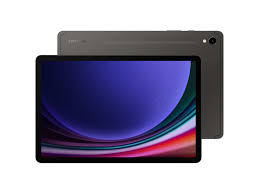
The back of the tablet features a clean and minimalist metal design with a smooth finish across most of the surface. Near the upper section, Samsung placed a magnetic charging area where the included S Pen can securely attach and recharge. Beside it are two rear camera lenses that slightly extend above the body by about 1 to 2mm.
Apart from the camera module, the rear panel remains uncluttered, containing only a small camera flash, subtle antenna bands, and the Samsung branding.
Samsung delivers outstanding build quality with the Galaxy Tab S9 Ultra, matching the high standards typically associated with its premium Ultra-branded products. The tablet’s massive display is clearly the centerpiece, offering an immersive viewing experience with minimal visual distractions around it.
Despite its sleek design, the large size can make the device somewhat inconvenient to carry and handle for long periods. Using a protective folio cover or similar case is highly recommended to improve portability and help safeguard the tablet from damage during everyday use.
Samsung’s Software Enhances Productivity
The Galaxy Tab S9 Ultra ships with Android 13 alongside Samsung’s One UI interface, and the company promises long-term support with four major Android upgrades and five years of security patches. Samsung also strengthens the connection between its devices, allowing the tablet to work smoothly with Galaxy smartphones for tasks such as answering calls, replying to messages, and sharing content across devices—similar to the integration found between Apple’s iPhone and iPad ecosystem.
Samsung places a strong focus on multitasking, making the tablet especially useful for advanced users and professionals. While standard Android typically supports only two split-screen apps plus a floating window, Samsung expands these capabilities by allowing up to three apps to run simultaneously in a tiled layout. One application can occupy half of the display while the remaining two divide the other half evenly. Users can also adjust the size of each app window and save preferred app combinations to the home screen or taskbar for quick access later, launching them instantly in their chosen layout and orientation.
The pop-up window feature expands multitasking even further by letting users open apps in floating, resizable panels that sit on top of other active screens. Alongside this, the taskbar provides quick access to recently used or favorite apps, making it easy to launch them into split-screen mode, pop-up view, or switch directly into full-screen applications without interrupting workflow.
Although Samsung has clearly invested significant effort into improving Android for large-screen use, the experience still doesn’t feel completely optimized for a tablet of this size—especially in landscape mode. For instance, opening apps like Google Docs in landscape can leave noticeable empty space on either side of the document, reducing the sense of immersion. While running multiple apps at once may feel tight on smaller foldable displays, the Tab S9 Ultra’s expansive 14.6-inch screen can sometimes feel almost overly spacious for certain workflows.
Portrait mode presents a different experience. In apps like Google Docs, the taller orientation uses the display more efficiently, showing more content at once—even when the on-screen keyboard is active. It’s also excellent for reading comics or graphic novels, where the large screen brings artwork to life with sharp detail and rich clarity without constant zooming. The only drawback is ergonomics, as holding such a large device vertically can be uncomfortable over time.
The included S Pen adds another layer of functionality, offering smooth and responsive input for writing and drawing. While it doesn’t fully replicate the feel of pen on paper, it comes impressively close and remains comfortable for extended use. The display is also highly durable, showing no noticeable flex even when pressure is applied during writing. Samsung even includes access to the Goodnotes app for one year at no cost, enhancing its note-taking appeal.
For users seeking a desktop-like experience, Samsung’s DeX mode transforms the tablet into a PC-style interface with a taskbar, resizable windows, and a traditional desktop layout. It works directly on the tablet screen but becomes far more efficient when paired with a keyboard, mouse, or trackpad. The Tab S9 Ultra can also connect to external displays via USB-C or wirelessly to compatible devices, including some smart TVs. When connected, users can choose between screen mirroring or extending the desktop across two displays. Overall, DeX provides a familiar computing environment that will feel intuitive to anyone accustomed to modern desktop operating systems.DeX Is Powerful, But Still Not a Full Laptop Replacement
Samsung’s DeX mode does a strong job of mimicking a traditional desktop environment, complete with resizable windows, a taskbar, and multi-app workflows. For many everyday tasks, it feels surprisingly close to a lightweight PC experience. However, when compared to a full Windows-based tablet like the Microsoft Surface Pro 9 or even the desktop-class flexibility of iPadOS on an iPad Pro, DeX still falls short in depth and software maturity. The Galaxy Tab S9 Ultra pushes Android productivity further than ever, but the platform itself still limits its ability to fully replace a laptop.
Strong Hardware, Consistent Performance
The base configuration of the Galaxy Tab S9 Ultra includes 12GB of RAM and 256GB of storage, with higher-end options offering up to 16GB of RAM and 1TB of internal space. All models are powered by the Snapdragon 8 Gen 2 for Galaxy chipset, designed specifically for Samsung devices.
In everyday use, the tablet performs smoothly across demanding workloads. Apps open quickly, multitasking is fluid, and switching between heavy tasks rarely causes lag or stutter. Benchmark results reinforce this performance level, with Geekbench 6 scores showing strong single- and multi-core output that competes closely with other flagship Android devices.
In broader productivity testing, the tablet also performs well, handling general mobile tasks with ease and maintaining stability under pressure. While Apple’s M-series iPad Pro models still lead in raw performance, Samsung’s flagship tablet remains highly capable for most real-world workflows.
Gaming and Thermal Efficiency
Gaming performance is one of the Tab S9 Ultra’s strongest areas. Demanding titles like Genshin Impact run smoothly at high settings and 60fps, with stable frame rates even during intense on-screen action. Less resource-heavy games also benefit from the large display, offering a more immersive experience without performance drops.
Thermals are well controlled, with the device staying relatively cool even during extended gaming sessions. This makes it suitable not only for productivity but also for long entertainment use without discomfort.
Battery Life and Charging Speed
The tablet is equipped with an 11,200mAh battery, which delivers solid endurance for a device of its size. In video streaming tests at full brightness, it lasts around 9.5 hours on a single charge. While this is respectable, some competitors with larger batteries can stretch further in similar conditions.
Charging is handled via 45W fast charging, although a charger is not included in the box. A full charge takes roughly 1 hour and 40 minutes, while a short 15-minute top-up provides around 20% battery, making quick charging convenient for busy users.
Connectivity and Wireless Performance
The Galaxy Tab S9 Ultra supports Bluetooth 5.3 and Wi-Fi 6E, ensuring fast and stable connections for peripherals and networks. However, it does not include NFC, and only certain models in the lineup offer optional 5G connectivity.
In Wi-Fi performance testing, the tablet delivers strong download speeds close to competing devices, with only minor differences depending on range and signal strength. Even at longer distances from a router, performance remains stable enough for streaming and productivity tasks.
Speakers and Audio Quality
Samsung equips the Tab S9 Ultra with a quad-speaker system tuned by AKG and enhanced with Dolby Atmos. The sound is loud, clear, and surprisingly rich for a tablet, with noticeable bass presence.
At maximum volume, the speakers can reach nearly 96dB without distortion, making them suitable for media consumption without external audio devices. That said, Bluetooth headphones or speakers still provide a more refined listening experience, especially for music enthusiasts.
Camera Performance
The rear camera setup includes a 13MP main sensor and an 8MP ultra-wide lens. In well-lit environments, images appear sharp with vibrant color reproduction, although Samsung’s typical processing can slightly boost saturation. Low-light performance is less impressive, with reduced detail and softer edges.
Interestingly, the front-facing dual-camera system is more useful in practice, especially for video calls. It produces clearer, more consistent results and benefits from an ultra-wide option that helps frame group calls or wider backgrounds more effectively. Like most tablets, low-light imaging remains a weak point.
Final Verdict: The Best Big Android Tablet
The Samsung Galaxy Tab S9 Ultra stands as one of the most powerful and refined large Android tablets available. Its massive display, strong performance, excellent multitasking tools, and deep Samsung ecosystem integration make it a top choice for productivity and media consumption.
However, despite its strengths, Android still limits it from becoming a true laptop replacement. Devices like the Microsoft Surface Pro 9 or Apple’s iPad Pro lineup still offer more complete productivity ecosystems for professional workloads.
Even so, for users committed to Android, there is currently no better large-format tablet than the Galaxy Tab S9 Ultra.
About the Reviewer
Technology has been a long-standing passion, and testing new gadgets—especially smartphones and tablets—is a core part of the job as a mobile writer for PCMag. Every device review is based on hands-on evaluation, with careful attention to whether a manufacturer’s claims hold up in real-world use. Since these devices are central to daily life, the testing process is thorough and focused on practical performance.
- No tags
Pros & Cons
-
- Gorgeous screen
- Fast performance
- Tight Samsung integration
- Good productivity software
- No tags
- Pricey
- Size makes it awkward to handle
- Android on tablets is still limiting
Samsung Galaxy Tab S9 Ultra Specification
| Battery Life | 9 hours, 30 minutes |
| CPU | Qualcomm Snapdragon 8 Gen 2 |
| Dimensions | 12.85 by 8.21 by 0.21 inches |
| Operating System | Android 13 |
| Screen Resolution | 2,960 by 1,848 pixels |
| Screen Size | 14.6 |
| Storage Capacity | 256 |
| Weight |